


CloudEdge
4.314.32K Reviews
App Specs
- Version
- 6.3.2
- Updated On
- License
- Free
- Downloads
- 1,000,000+
- Developer
- Hangzhou Meari Technology Co., Ltd.
- Categories
- Lifestyle
- Platform
- Android, iOS
Screenshots
 Analysis by AppCompare
When more than one person in a household needs to check a camera or doorbell, the hard part is rarely opening a live view; it is agreeing on who checks which alert, and what everyone should do next. I see CloudEdge as most useful when a home has compatible cameras, doorbells, or sensors and people want a shared place to access them. It is a free lifestyle app from Hangzhou Meari Technology Co., Ltd., with a 4.4 average from around 88,000 ratings and over a million installs. That reach may reassure a new user, but the practical question is whether its device-centered approach fits the way your household actually shares access.
One household, several reasons to check in
Picture a weekday evening: one person is cooking, another is arriving home, and a delivery is expected. A doorbell camera in CloudEdge can make it easier for whoever is available to check the entrance rather than interrupting the person nearest the phone. In a different routine, a sensor alert may prompt a quick check while someone is away. These are modest conveniences, but they can make connected devices feel more useful than a collection of separate gadgets.
The benefit depends on everyone having a clear routine. If two people both assume the other has responded to an alert, the app cannot settle that confusion for you. I would agree in advance who handles deliveries, unexpected visitors, or movement notifications, and use a household chat or a direct conversation for anything that needs a response. A camera feed gives people a view; it does not replace coordination.
Set boundaries before adding shared devices
Before connecting a device, I would decide which rooms and entrances genuinely need monitoring and who should be able to view them. A front-door camera has an obvious shared purpose; a camera aimed at a private space raises a different set of questions. Discuss placement with the people who live in or regularly visit the home, and avoid treating convenience as a reason to record every corner.
CloudEdge is built around adding compatible devices to an account, so it helps to think through account access before setup rather than handing around one person’s login casually. Keep credentials private, use a strong password, and make sure everyone knows how to contact the account holder if access stops working. If a household member moves out or a device changes hands, review who can still sign in and deal with access deliberately. These habits matter even when the app itself feels straightforward.
Alerts need a household plan
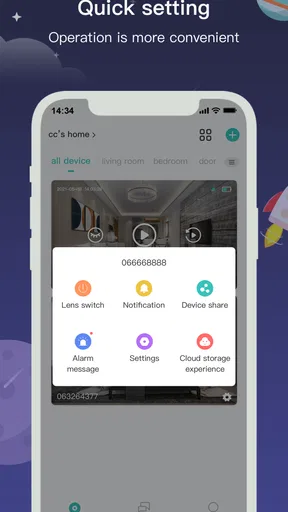
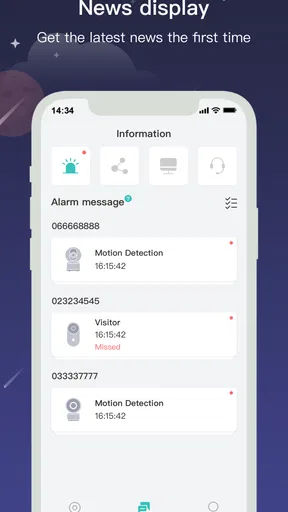
Custom alerts can be useful when they answer a specific question, such as whether movement at the entrance needs a look. They become less helpful when every minor event interrupts everyone. I would start with the notifications that matter most, then adjust them after seeing how they fit a normal day. If an alert repeatedly arrives when nobody can act on it, the answer may be a clearer responsibility plan rather than more phone checking.
Voice control can also reduce friction in a busy moment. Asking Alexa or Google Assistant to show a front-door camera, as described in the app’s use, may be convenient while your hands are occupied. It is still worth considering who else can hear or use the assistant in a shared room. I would keep voice access focused on practical tasks and avoid assuming that every household member will prefer speaking commands over using the phone.
Worth Reading Before You Choose

Flipboard Shows What News Apps Must Do Beyond the Feed

Switching to Android Auto Means Rethinking Your Driving Routine

Google Calendar Makes a Crowded Week Easier to Manage

Ludo King Makes the Most of the Minutes Between Plans

Baby Panda World Brings Quick Play to Modern Phones, but Its Game Library Feels Busy

ESPN’s Live Game View Makes Following Close Games Easier
Age, trust, and realistic expectations
CloudEdge is rated for Everyone, so its age label is broad, but that does not mean every child should manage security devices or receive every alert. I would keep account credentials and decisions about device access with a responsible adult, then explain in simple terms what a camera or sensor does and why it is there. For children old enough to use a shared phone, agree on when checking a feed is appropriate rather than making constant monitoring feel normal.
Trust also comes from knowing what the app can and cannot do for a household. A live view or notification can help someone notice activity, but it should not be treated as proof that a home is safe or as a substitute for checking a situation directly when it is appropriate. People who need a carefully documented security workflow, extensive household permissions, or a system designed around professional monitoring may be better served by a dedicated security service or another platform that clearly matches those needs.
CloudEdge has been available since November 23, 2017, and version 6.1.3 supports Android 5.0 or later. The app is free to install, with in-app purchases ranging from $1.99 to $359.99 per item. I would check the purchase details in context before paying, especially if a feature appears tied to a device or service you are considering. A free download does not mean every possible service is included, so it is sensible to confirm what you need before building a household routine around it.
Its 14,000 reviews sit alongside the broader rating picture, but neither number tells me whether a particular camera will suit your home. Compatibility should come first: identify the device you own or plan to buy, then confirm that it is intended to work with CloudEdge before spending time on setup. If you already use a manufacturer’s app for a camera, compare the everyday tasks you care about—live viewing, alerts, and household access—rather than switching just because a single dashboard sounds simpler.
Compared with a general smart-home hub, CloudEdge is best considered as a way to manage supported video and sensor devices, not as a reason to expect every connected product in the home to appear in one place. A device maker’s own app may offer a more direct experience for a single product, while a broader hub can be a better fit for someone coordinating many types of equipment. The trade-off is straightforward: a focused app can keep camera access convenient, but it may not replace the wider automation and cross-brand control a household wants.
For a shared home, I would keep the first setup small. Add the entrance device, test its live view, and let the people who will actually use it learn the basic routine before connecting more. This reveals practical snags early: whether the right person notices alerts, whether the view is easy to reach, and whether notifications are too frequent. It is a more useful test than adding every available device on day one and discovering later that nobody knows which alert matters.
Getting Started with CloudEdge
First things first, downloading CloudEdge is a breeze. Available on both Android and iOS, you can easily find it on the respective stores. Once you get it on your device, setting it up is pretty intuitive. The app prompts you to create an account or log in if you’ve already taken the plunge into this smart world.
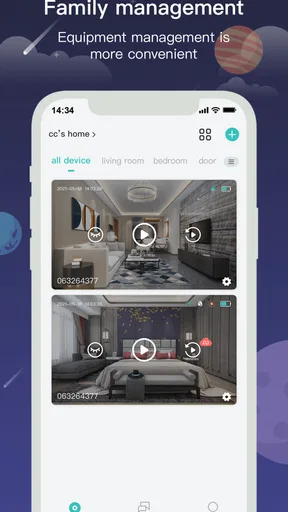
As soon as you’re in, the user interface strikes you with its simplicity. I mean, no one wants to get lost in a labyrinth of menus, right? The homepage greets you with a neat dashboard where all the magic happens. Adding devices is straightforward; you just hit the plus sign and follow some simple instructions. Before you know it, you’re connected!
Features That Make Life Easier
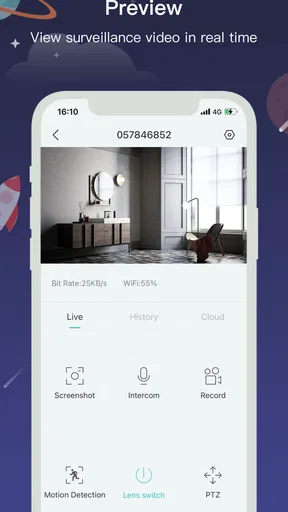
Now, let's dive into the features. One of the standout aspects of CloudEdge is its ability to connect with a wide range of smart devices. Whether it’s cameras, doorbells, or sensors, this app has you covered. I added my smart camera, and voilà, live streaming with just a tap!
Oh, and here’s a pro tip: if you’re a fan of voice commands, CloudEdge plays nice with Alexa and Google Assistant. I tested it out, and it’s quite satisfying to control your devices just by asking. Imagine being in the kitchen and asking Alexa to show the front door camera. Handy, right?
Performance and Reliability
Performance-wise, CloudEdge is pretty solid. The app runs smoothly without any noticeable lag, which is crucial when you’re accessing live feeds or controlling devices. It’s reliable, and that’s something you can’t compromise on when it comes to home security.
I’ve been using it for a few weeks now, and I haven’t encountered any crashes or bugs. The developers seem to be on top of things since the app receives regular updates. It’s always reassuring to know that the app you’re using is actively maintained.
Security Matters
Speaking of security, CloudEdge takes it seriously. The app offers encrypted data transmission, which means your video feeds and personal information are kept safe from prying eyes. In today’s world, that’s a comforting thought.
For those who are a bit more tech-savvy, you’ll appreciate the ability to set up custom alerts and notifications. I set mine to notify me whenever there’s unexpected movement detected by my doorbell camera. It’s like having a digital watchdog, minus the barking.
Final Thoughts
So, is CloudEdge worth your time? In my opinion, absolutely. It’s a versatile, user-friendly app that makes managing your smart home a breeze. Whether you’re a tech enthusiast or just getting started with smart devices, CloudEdge is a reliable companion.
To wrap it up, if you’re looking for an app that simplifies your life while keeping your home secure, give CloudEdge a try. It’s like having a little piece of the future right in your pocket. And who doesn’t want that?
Who will get the most from it?
I would recommend CloudEdge to someone who already has compatible cameras, doorbells, or sensors and wants a simple way to reach them from a phone. It also makes sense for households where one person handles setup but other adults need a practical way to check an entrance or respond to a notification. For that use, its straightforward dashboard is more appealing than juggling separate apps for every supported device.
I would be more cautious if you have not chosen your hardware yet. Start with the device rather than assuming an app will support every camera or doorbell you find. If you rely on one brand’s product ecosystem, its own app may be the less complicated option. If you want a single control center for lighting, heating, entertainment, and security across different brands, a broad smart-home platform may suit you better than an app focused on video services.
A useful test before relying on it
After setup, I would check the app in the exact situations where you expect to use it: open a live feed from your home network, try again while away if that is part of your routine, and confirm that the right household member knows how to find the device. Treat those as practical checks, not assumptions. A quick test can uncover an account or connection issue before a delivery arrives or someone is waiting at the door.
It is also worth deciding how you want to handle an alert when you are busy. If you cannot respond immediately, who else should look? If nobody is available, is the alert merely informational, or does it require a call or another action? CloudEdge can put device information within reach, but a clear plan prevents a notification from becoming a source of uncertainty.
My household verdict
My overall view is that CloudEdge works best as a convenient access point for compatible home video devices, especially when people agree on account care, alert expectations, and privacy boundaries. Its simple setup and live-view focus can help a household check in without turning every routine into a complicated smart-home project. The experience is less compelling if you expect universal device compatibility, elaborate user roles, or a full automation hub.
I would try it when the hardware already fits and the household wants an uncomplicated way to view cameras or respond to doorbell activity. I would skip it, or compare alternatives first, if strict separation between household users or broad cross-brand control is essential. That distinction is more important than the app’s headline appeal: a useful shared view depends on compatible devices and sensible coordination, not on asking everyone to monitor the same feed.
Pros
- User-friendly interface simplifies setup.
- Real-time alerts for enhanced security.
- Supports multiple cameras seamlessly.
- Customizable motion detection settings.
- Cloud storage options for video backup.
Cons
- Occasional connectivity issues.
- Limited free cloud storage.
- App notifications can be delayed.
- Camera setup can be time-consuming.
- Subscription required for premium features.
FAQs for CloudEdge
What is CloudEdge and what does it offer?
CloudEdge is a versatile app designed to enhance the security of your home or office by providing real-time monitoring through smart cameras. It offers features like live streaming, motion detection alerts, and cloud storage, allowing users to keep an eye on their property from anywhere using their Android or iOS devices.
Is CloudEdge compatible with all smart cameras?
While CloudEdge supports a wide range of smart cameras, it is essential to check the compatibility list provided by the app. Generally, it works seamlessly with many popular camera brands, but it's advisable to verify your camera model’s compatibility before downloading the app to ensure full functionality.
Does CloudEdge require a subscription for cloud storage?
CloudEdge offers both free and subscription-based cloud storage options. The free plan provides basic storage capacity, while premium plans offer extended storage and additional features. Users can choose a plan based on their storage needs and the number of devices they want to connect, ensuring flexibility in their security setup.
How does CloudEdge handle data privacy and security?
CloudEdge prioritizes user privacy and data security by implementing advanced encryption protocols. This ensures that video feeds and personal information are protected from unauthorized access. Additionally, CloudEdge regularly updates its security features to address potential vulnerabilities, providing users with peace of mind regarding their data confidentiality.
What are the main pros and cons of using CloudEdge?
CloudEdge offers several advantages, such as ease of use, reliable performance, and comprehensive monitoring features. However, some users might find the app’s interface complex initially, and certain advanced features may require a subscription. Evaluating the app’s features against your specific needs can help you determine if it’s the right choice for your security setup.


